
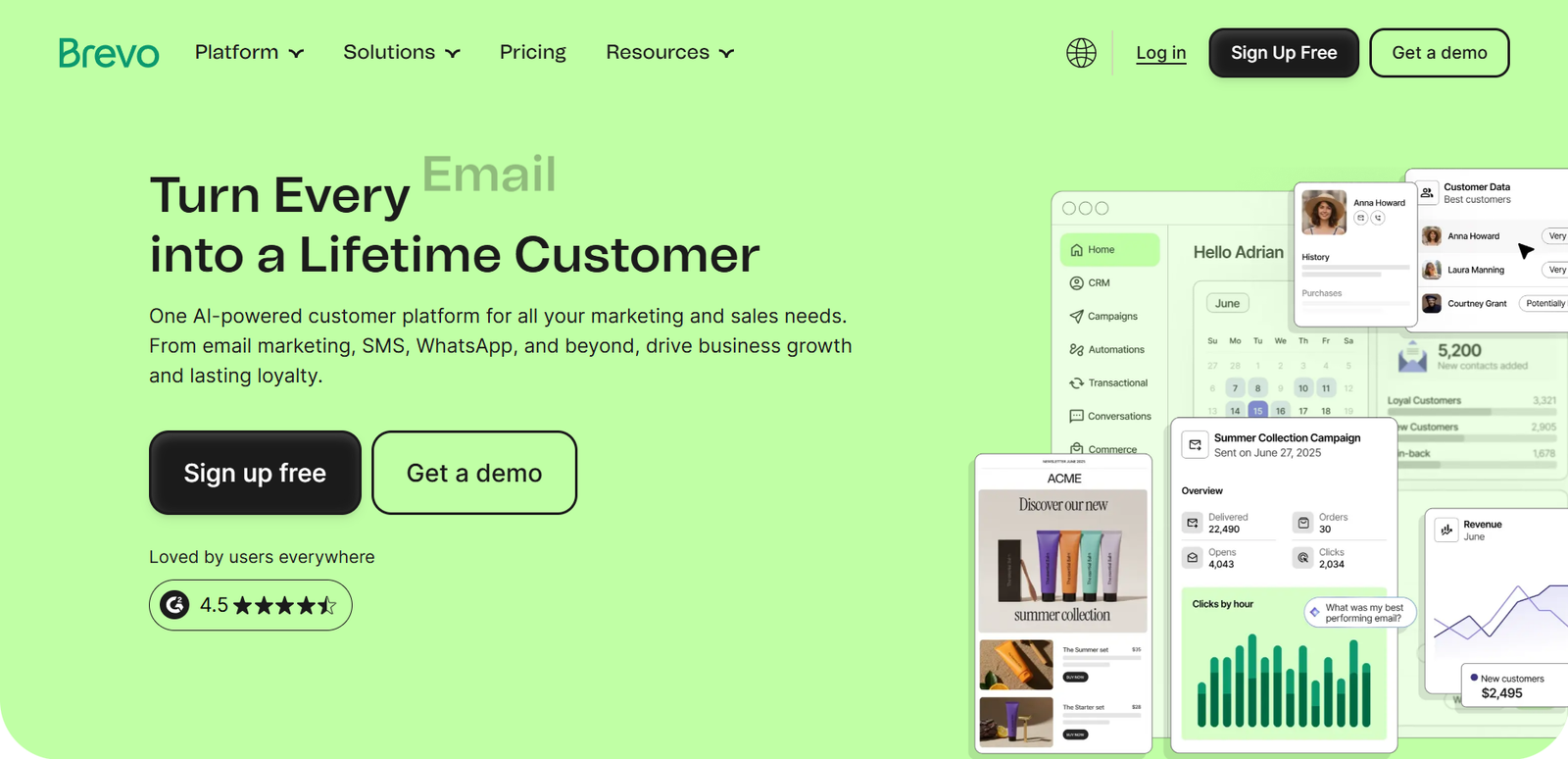
Brevo Review: Is this email marketing platform a smart choice for your business, or would a simpler alternative offer better value?
Brevo combines email campaigns, contact management, marketing automation, transactional messaging, and additional customer communication tools in one platform. Its appeal is especially clear for businesses that want to manage substantial contact lists without necessarily sending large numbers of marketing emails every month.
However, an attractive entry price does not mean every important feature is included. Automation capabilities, reporting, testing, and advanced multichannel tools vary by plan.
This review explains what Brevo does, how its workflows fit real businesses, what its pricing structure means in practice, and when you should consider another provider.
Research methodology: This review is based on Brevo’s official pricing information, product descriptions, and published frequently asked questions reviewed on November 18, 2026. It is a documentation-based evaluation, not a claim that we personally tested Brevo’s software or independently measured email deliverability. Pricing, feature availability, and policies may change; confirm current terms on the official website before purchasing.
Affiliate disclosure: Some links on this website may be affiliate links. If you purchase through an approved affiliate link, we may earn a commission at no additional cost to you. Our recommendations are based on product suitability, not commission size. At the time of preparing this review, no approved Brevo affiliate link has been supplied; the Brevo links referenced below are ordinary official website links.
Brevo Review: Key Features at a Glance
Best for: Small businesses, marketers, online stores, and organizations that need email campaigns alongside transactional messaging and room to expand into automation.
Standout advantage: A pricing approach centered on email-sending volume can be appealing when a business has many contacts but sends relatively infrequently.
Main limitation: The inexpensive entry-level plan should not be confused with access to the platform’s more advanced marketing tools. Businesses needing sophisticated automation or testing must evaluate higher-tier plans.
Overall assessment: Brevo deserves consideration, particularly for cost-conscious teams that want a broader communication platform. Whether it is the best buy depends on your sending frequency, required workflows, and the total cost of the features you actually need.

What Is Brevo?
Brevo is a customer communication and marketing platform with email marketing at its core.
Businesses can create promotional email campaigns, manage contacts, organize audiences, and send transactional messages such as order confirmations or account notifications. Depending on the plan and connected tools, they can also build automated workflows and use additional communication channels.
This makes Brevo different from a tool designed only for composing newsletters.
A growing company might use it to send a monthly product update, trigger an onboarding email after a signup, and deliver a password-reset message from its website. Those messages have different purposes, and Brevo brings several of the underlying tools into one ecosystem.
That does not automatically make it the right platform for every organization.
If your only requirement is a basic weekly newsletter, a simpler service may be easier to learn. Conversely, if you require complex customer journeys, you should check exactly which automation features are available on the plan you intend to purchase.
Who Is Brevo Best For?
Brevo is particularly relevant to businesses that care about sending volume as much as contact count.
A company with a large but relatively quiet customer database may have different needs from a creator who sends several messages every week to every subscriber.
Small businesses can use Brevo to manage newsletters, announcements, and lead-capture forms without immediately committing to a large marketing budget.
Ecommerce businesses may value the combination of promotional and transactional emails.
Agencies and larger marketing teams may be interested in advanced reporting, multiple channels, and account-management features, although those capabilities can require more expensive plans.
Brevo may be less compelling for a creator who wants the simplest possible newsletter workflow, or for a business whose required automation features make the overall plan price less competitive than alternatives.
What Problems Does Brevo Solve?
Keeping Customer Communications in One Place
Without a coordinated platform, a business may store contacts in one application, send promotions from another, and use a separate provider for website notifications.
Brevo can reduce that fragmentation by supporting marketing campaigns and transactional email infrastructure within the same product family.
Organizing Different Audiences
Not every contact should receive every message.
Segmentation helps businesses separate customers from prospects, distinguish recent purchasers from inactive subscribers, or target contacts according to relevant attributes.
More precise targeting can improve message relevance, although results depend on the quality of your data and campaign strategy.
Reducing Repetitive Marketing Tasks
Automation can replace manual follow-up for suitable events and customer journeys.
For example, a business might want a welcome sequence for new subscribers or follow-up communication after an important action.
The practical question is not simply whether Brevo supports automation, but whether your selected plan includes the triggers, conditions, and workflow depth you need.
7 Essential Brevo Features Explained
1. Email Campaign Builder and Templates
Brevo provides a drag-and-drop editor and email templates for designing campaigns.
For a small business, this can make it possible to assemble an announcement or promotional message without writing HTML.
A template is a starting point, however, not a substitute for good copy, accessible formatting, and mobile testing.
Before sending, teams should check links, sender details, subject lines, and how the email appears on mobile devices.
A visually polished campaign still needs a relevant offer and a properly maintained audience.

2. Contact Management and Segmentation
Contact management is the foundation of effective email marketing.
Brevo supports contact lists and segmentation, allowing marketers to send different content to different groups.
A local service business might separate new inquiries from existing customers; an online retailer might distinguish repeat purchasers from first-time buyers.
Segmentation is only useful when the underlying information is reliable.
Businesses should collect contacts lawfully, maintain consent records where required, and remove invalid or unwanted addresses.
Poor list quality can undermine performance regardless of the platform chosen.
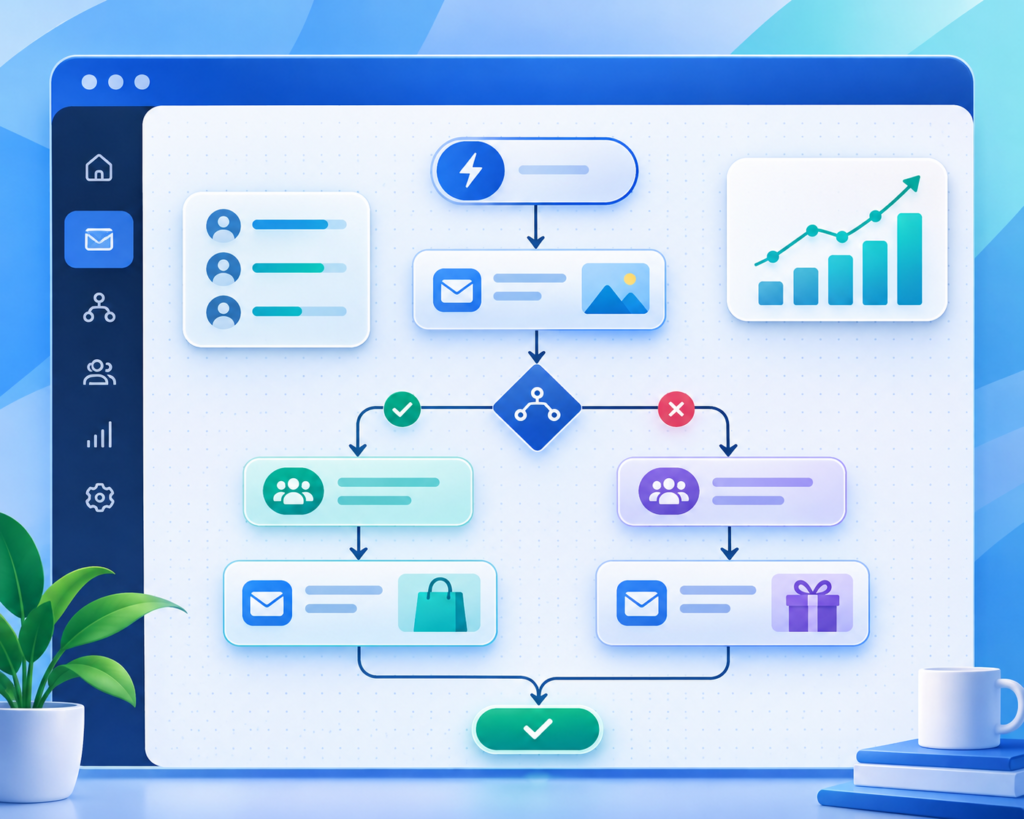
3. Marketing Automation
Automation is one of the most important features to examine before buying Brevo.
Its Standard tier, according to the supplied official pricing materials, includes marketing automation capabilities.
These can support journeys that respond to contact behavior rather than relying on one-off manual campaigns.
A practical example is a welcome series: someone subscribes, receives an introduction, and later gets a relevant follow-up.
More advanced workflows might depend on event tracking or additional conditions.
Exact triggers, limits, and available workflow options should be checked against Brevo’s current plan documentation.
Do not choose Starter solely because of its low advertised price if automation is central to your strategy.
Compare the complete cost of the plan that actually includes your required functionality.

4. Transactional Email Through SMTP and API
Brevo’s published FAQ states that all plans include access to transactional email capabilities, including SMTP and RESTful APIs.
Transactional emails are operational messages triggered by actions, such as order receipts, registration confirmations, and password resets.
They are different from newsletters because the recipient expects them as part of a service interaction.
This can be valuable for websites and ecommerce operations that need reliable message infrastructure.
Brevo also references developer documentation, SDKs, libraries, and integrations with major content management systems.
Actual implementation still requires technical setup, authentication, and monitoring.
Importantly, the presence of transactional email features does not establish a particular deliverability rate.
Deliverability depends on sender authentication, reputation, content, recipient behavior, and other factors.
We have not independently tested Brevo’s inbox placement.
5. Forms and Lead Collection
Signup forms help convert website visitors into subscribers.
For a blog, a form might invite readers to receive new articles.
For a service company, it might capture interest in a consultation or downloadable resource.
Brevo’s entry-level feature information includes forms and list-building capabilities.
Businesses should use clear consent language and avoid collecting unnecessary personal data.
Form design matters, but the value proposition matters more: people need a compelling reason to subscribe.
6. Analytics, Testing, and Optimization
Basic reporting helps marketers understand whether campaigns are reaching and engaging their audiences.
More advanced analysis and A/B testing are associated with higher Brevo plans in the provided pricing materials.
A/B testing can help compare two versions of a subject line or another campaign element, but meaningful conclusions require adequate sample sizes and careful interpretation.
Open-rate data should not be treated as a perfect measure of human attention because email privacy protections can affect tracking.
Clicks, conversions, and downstream business outcomes often provide more useful context.
7. Additional Channels and Advanced Business Tools
Brevo positions higher-tier offerings around broader marketing and organizational needs.
The supplied pricing information associates Professional with more advanced multichannel capabilities and Enterprise with features such as account-management options, single sign-on, and tailored support arrangements.
These features matter primarily when a business has the staff and processes to use them.
A small company should not pay for enterprise-grade controls simply because they sound impressive.
Conversely, an organization with strict access requirements should verify security and administration capabilities before selecting a cheaper plan.
How Brevo Works: A Practical Workflow
A typical marketing setup begins by creating an account, importing or collecting contacts, and organizing those contacts into relevant audiences.
The business then creates an email using a template or drag-and-drop editor, reviews sender authentication and consent requirements, and sends a campaign or schedules it for later.
As needs become more advanced, the team can connect its website or ecommerce platform, configure transactional messages, and build automated follow-up sequences where supported.
After sending, it reviews campaign results and refines the next message.
This workflow sounds straightforward, but successful implementation requires planning.
Teams should define the goal of each message, establish who should receive it, and decide how success will be measured.
Brevo provides tools; it does not automatically supply a marketing strategy.
Practical Business Use Cases
For a local business, Brevo can support appointment reminders, seasonal promotions, and customer newsletters.
For an ecommerce store, the combination of promotional campaigns and transactional messaging may simplify communications.
For a content publisher, signup forms and segmented newsletters can support audience development.
A growing B2B business might use contact segments and automation to follow up with leads at different stages.
However, a company requiring complex sales-pipeline management should compare Brevo’s available capabilities with a dedicated CRM rather than assuming the email platform replaces every sales tool.
Brevo Pricing and Plans: What Will You Actually Pay?
Brevo’s pricing deserves close attention because a low starting price can be misleading if your business needs higher-tier features or sends more emails than the selected allowance.
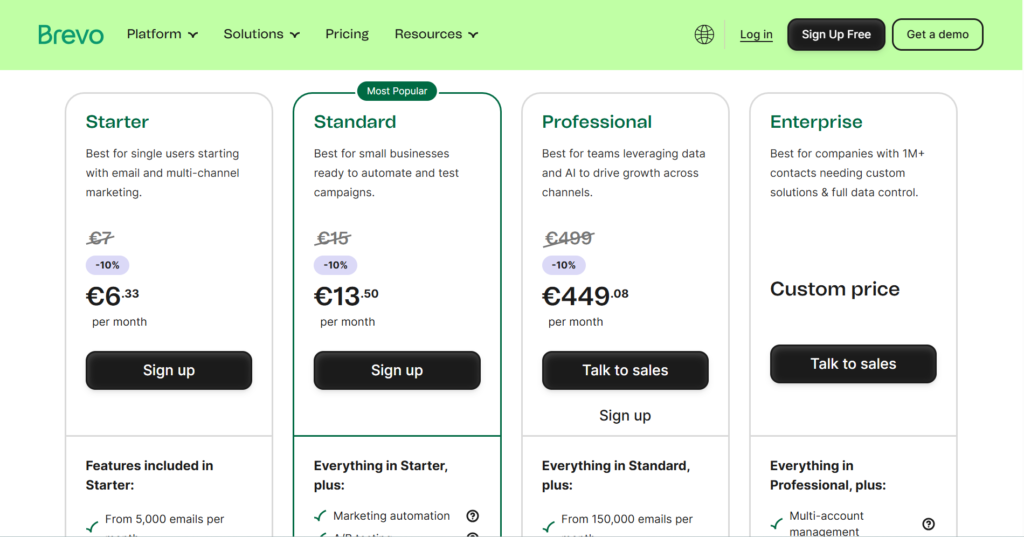
The official pricing screenshots supplied for this review, captured on November 18, 2026, displayed euro-denominated starting prices with annual billing and a stated 10% annual discount.
They showed the following starting points:
| Plan | Displayed Starting Price |
|---|---|
| Free | €0 |
| Starter | From €6.33/month |
| Standard | From €13.50/month |
| Professional | From €449.08/month |
| Enterprise | Custom pricing |
These prices reflect the captured annual-billing configuration. They are not guaranteed quotes for every sending volume or region.
Monthly billing, email allowances, optional features, taxes, and regional settings can change the final cost.
Always consult the official Brevo pricing page before purchasing.
Free: Useful for Evaluating the Platform
Brevo’s FAQ says a new account starts on the Free plan and can send up to 300 emails per day once approved for sending.
It also says a credit card is not required to sign up.
This is useful for learning the interface or running a small-volume newsletter, but the daily cap is a real constraint for a growing audience.
Starter: Basic Email Marketing
Starter is positioned for businesses needing core email campaigns, templates, segmentation, forms, and basic reporting.
Its appeal is the lower entry cost.
The trade-off is that buyers needing richer automation or experimentation should look beyond the cheapest tier.
Standard: A More Capable Marketing Setup
The provided official pricing materials identify Standard as the tier where marketing automation, A/B testing, and more advanced analysis become important differentiators.
For a business planning customer journeys rather than occasional broadcasts, Standard may offer a more appropriate balance of features and cost.
Professional and Enterprise: Specialist Requirements
Professional targets more advanced marketing operations and carries a substantially higher displayed starting price.
Enterprise is a custom offering for organizations requiring additional administration, security, integrations, or support arrangements.
Neither should be treated as a default upgrade for a small business.
Pay-as-You-Go Credits
Brevo’s published FAQ describes a pay-as-you-go option for organizations that send infrequently.
According to that FAQ, email credits do not expire and one sent email consumes one credit.
The FAQ also notes that phone support is not included with this option.
This model may suit seasonal senders, but buyers should compare the total cost of credits with a subscription before deciding.
The Pricing Question Most Buyers Overlook
Ask how many emails you send in an average month, how many contacts you maintain, and which advanced features you genuinely require.
A business with a large contact database and modest sending needs may value Brevo’s approach.
A business sending frequent campaigns or requiring sophisticated automation should calculate the total cost at its actual usage level.
Brevo Review: Pros and Cons
Pros
- A free starting plan allows users to explore the platform without entering credit card details, according to Brevo’s FAQ.
- Marketing campaigns and transactional email tools are available within the same ecosystem.
- Segmentation, forms, and a visual email editor support common small-business workflows.
- A sending-volume-oriented pricing approach may suit organizations with large but less frequently contacted lists.
- Higher tiers offer room to expand into automation, testing, and more advanced communication needs.
- Pay-as-you-go credits offer an alternative for occasional senders.
Cons
- Advanced capabilities are not all included in the least expensive plan.
- The Free plan’s 300-email daily limit can become restrictive quickly.
- The jump to Professional is significant in the supplied pricing configuration.
- Pricing comparisons require attention to sending allowances, billing terms, and optional features.
- Businesses seeking an extremely simple newsletter-only experience may find the broader platform unnecessary.
- We have not independently verified deliverability performance or tested support response times.
Ease of Use, Integrations, and Support
Brevo describes its interface as beginner-friendly, and its official FAQ says prior technical knowledge is not required to create emails and contact lists.
That is encouraging, but it should not be interpreted as an independently verified usability test.
Advanced workflows, integrations, and transactional email configuration can still involve a learning curve.
Brevo’s documentation references APIs, SMTP, SDKs, and CMS integrations.
This flexibility may be valuable for developers and ecommerce teams.
Before committing, check that your exact website platform, store, or CRM integration supports the data and events your workflows need.
Support availability also varies by product and plan.
The supplied pricing information mentions email support on lower paid tiers and more extensive options on higher tiers.
The pay-as-you-go FAQ specifically says phone support is not included.
Check current support entitlements and service terms if assistance is critical to your operation.
Security, Privacy, and Scalability
Email platforms process contact information, so privacy and security deserve attention during procurement.
Businesses should review Brevo’s current data-processing terms, access controls, retention settings, and documentation relevant to their jurisdiction.
They should also ensure their own signup forms, consent procedures, and unsubscribe practices comply with applicable rules.
Enterprise-level administration features may matter to larger teams, but the availability of a feature is not proof that a particular deployment meets every regulatory requirement.
Organizations with formal compliance obligations should request and review the appropriate current documentation directly from Brevo.
Brevo Affiliate Program: What Publishers Should Know
Brevo has an official affiliate program aimed at bloggers, creators, and publishers.
Its published FAQ describes a fixed reward for a referred customer who subscribes, a 90-day tracking cookie, and monthly validated payouts through PartnerStack.
The materials supplied for this review do not disclose the exact fixed commission amount, so no earnings figure is assumed here.
The application requirements are relevant to new websites.
Brevo says applications without a primary website, and applications from new websites without traffic, will not be accepted.
It also requires a professional email address associated with the applicant’s website domain.
Approval is subject to individual review.
These program details are included for transparency, not as a reason to recommend the software.
The buyer’s decision should depend on whether Brevo meets their needs.
Official program information: Brevo Affiliate Program.
Brevo vs. MailerLite, GetResponse, and ActiveCampaign
Brevo vs. MailerLite
MailerLite is a sensible alternative to evaluate when simplicity, newsletters, and straightforward audience growth are the priorities.
Brevo becomes especially interesting when transactional email and broader communication requirements are part of the decision.
Compare the current paid plans rather than assuming either product is always cheaper.
For our separate MailerLite analysis, see our MailerLite Review.
Brevo vs. GetResponse
GetResponse is another established email marketing option worth comparing for campaign creation, automation, and marketing workflows.
Brevo’s transactional messaging and sending-volume-oriented model may be relevant differentiators.
Which is better depends on the specific plan limits, your required integrations, and how often you email your audience.
For more information, read our GetResponse Review.
Brevo vs. ActiveCampaign
ActiveCampaign is worth investigating when sophisticated automation and customer journeys are the central buying criteria.
Brevo may be a more natural starting point for a business prioritizing a free entry plan, routine campaigns, and transactional email infrastructure.
Do not compare entry-level prices alone: evaluate the plan that includes the workflow features you need.
Explore the differences further in our ActiveCampaign Review.
These are qualitative comparisons based on product positioning and the available research, not a live feature-by-feature price audit of all competitors.
Check each provider’s current plan documentation before deciding.

Best Brevo Alternatives
MailerLite
MailerLite is worth considering if you mainly need accessible newsletter creation and subscriber management.
Evaluate its automation and sending limits at your anticipated audience size.
GetResponse
GetResponse may appeal to teams wanting a different combination of campaign tools and marketing workflows.
Compare the actual features and costs of the relevant plans.
ActiveCampaign
ActiveCampaign deserves attention if automation sophistication is a major requirement and you are prepared to evaluate a more advanced setup.
Confirm that its pricing and plan restrictions fit your business.
Mailchimp
Mailchimp is another familiar option for businesses comparing newsletter tools and marketing integrations.
It is worth reviewing, but brand familiarity alone is not a reason to choose it over Brevo.
Compare your contact count, sending needs, and required functionality.
Who Should Choose Brevo?
Choose Brevo for serious consideration if you want a single platform for routine email campaigns and transactional messages, need segmentation and forms, or prefer to evaluate a sending-volume-based pricing model.
It is also a practical candidate for teams that expect to expand into automation later, provided they understand the higher-tier costs.
Consider an alternative if your priority is the simplest possible newsletter interface, your preferred automation tools are unavailable on an affordable Brevo plan, or your business requires specialized features that another provider handles more directly.
Brevo Review: Is It Worth It? Final Verdict
Brevo is worth shortlisting for businesses that need more than a basic newsletter sender but still care about controlling costs.
Its combination of email marketing, transactional messaging, contact segmentation, and optional automation gives it a useful range of applications.
The Free plan also makes initial exploration accessible.
The deciding factor is not the advertised entry price.
It is the cost of the plan that supports your actual sending volume and workflows.
Starter may be enough for straightforward campaigns; Standard is more relevant when automation and testing become important; Professional and Enterprise are aimed at substantially more demanding requirements.
Our recommendation is to map your sending needs, choose three must-have features, and compare Brevo’s current plan against at least two alternatives.
If Brevo covers those needs at a competitive total cost, it is a credible choice.
If not, the right decision is to select the better-fitting tool rather than pay for a brand or a long feature list.
Explore current Brevo plans and terms on the official Brevo pricing page.
Frequently Asked Questions
Is Brevo Free to Use?
Brevo offers a Free plan.
Its official FAQ states that, once an account is approved for sending, the Free plan allows up to 300 emails per day.
Confirm current limits before relying on it for production campaigns.
Do I Need a Credit Card to Create a Brevo Account?
According to Brevo’s published FAQ, no.
Registration requires an email address and organization name rather than credit card details.
Does Brevo Support Transactional Email?
Yes.
Brevo’s FAQ states that all plans provide transactional email features, including SMTP and RESTful API access.
Implementation and usage conditions should be checked in the current documentation.
Is Brevo Good for Beginners?
Brevo provides templates and a visual email editor and presents itself as accessible to beginners.
Basic campaigns may be approachable, while integrations and advanced automation can require more learning.
Does Brevo Charge Based on Contacts or Emails Sent?
Brevo emphasizes email-sending allowances in its marketing pricing.
Your actual cost depends on the selected plan, sending volume, and any extras.
Check the current pricing calculator rather than relying on a single advertised starting price.
Can I Cancel a Brevo Plan?
Brevo’s FAQ says users can cancel their plans from their accounts.
Review the applicable subscription and billing terms before purchase, especially when choosing annual billing.
Are Brevo Pay-as-You-Go Credits Time-Limited?
The supplied official FAQ says pay-as-you-go email credits do not expire.
Confirm that this remains true for the credits and region you intend to purchase.
Is Brevo Better Than MailerLite or ActiveCampaign?
Not universally.
Brevo may suit businesses seeking transactional messaging and flexible sending arrangements.
MailerLite may be attractive for simpler newsletter needs, while ActiveCampaign deserves comparison for more advanced automation.
The right answer depends on your workflows and total plan cost.
Research and maintenance note: Prepared using official Brevo pricing and affiliate-program screenshots and FAQs supplied on November 18, 2026. The displayed euro starting prices reflect the captured annual-billing configuration and must be rechecked before publication. Exact affiliate commission amount, current competitor plan comparisons, and independent deliverability results remain unverified. Review pricing, feature availability, affiliate conditions, and linked pages periodically. This article is a documentation-based editorial assessment, not a hands-on test.



Pingback: ActiveCampaign Review: 7 Powerful Insights Before You Buy